
Insights & guides
An AI system built on your tools: understand your work first, then automate
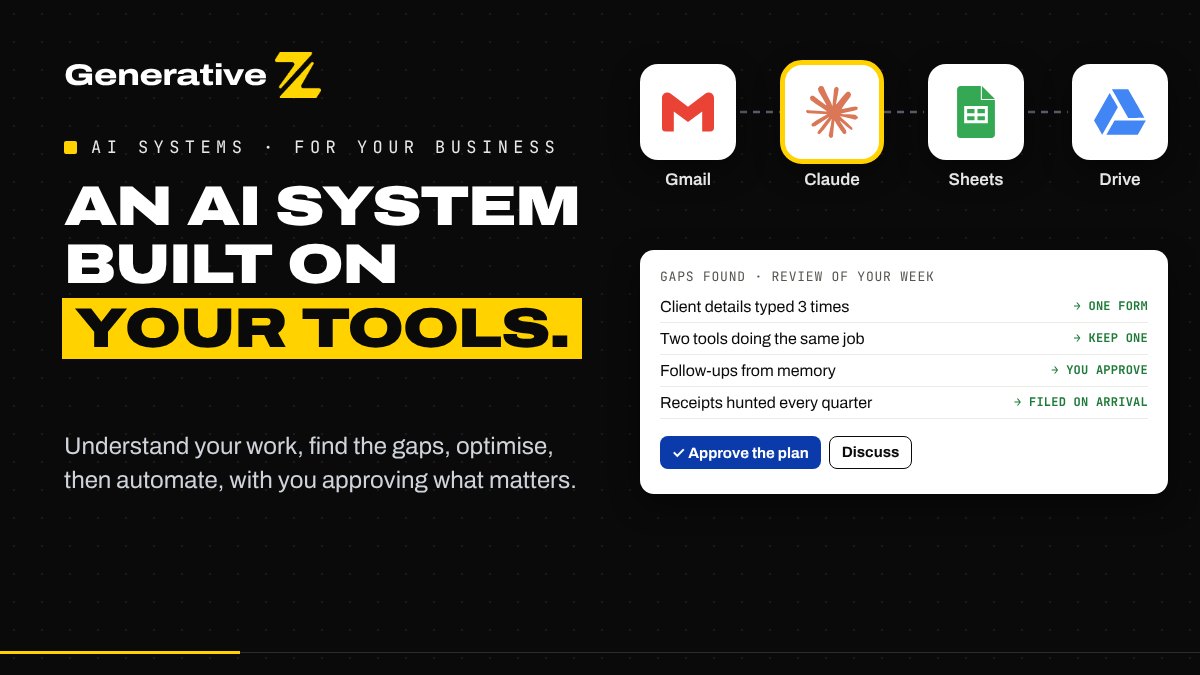
Most small businesses and freelancers do not need another app. They need the tools they already pay for to work together. This is how we build an AI system around your work: we understand it first, find where time and money leak, optimise, and only then automate, with you approving what matters.
The problem: more tools, not less work
Look at the tools a small business uses in a normal week: email, a spreadsheet or a CRM, an invoicing program, a calendar, a form builder, a messaging app, a file storage, sometimes a scheduling tool and an automation tool on top. Each one was added to solve a problem. Together, they create new ones:
- the same client details typed into three places;
- information that lives in someone's inbox and nowhere else;
- follow-ups that depend on memory;
- subscriptions that overlap, or seats nobody uses anymore.
Adding an AI tool to that pile rarely helps. It becomes one more tab, one more subscription and one more place to check.
Our approach: understand before automating
An AI system is not an app. It is a small set of connections between the tools you already use, with AI where reading or writing is needed, fixed rules where a decision must be reliable, and you where judgement matters.
We build it in five steps.
1. Understand your work
We start with a call and a short review of a typical week. Which tasks come back every day or every week? Which tools do you open for each one? What do you copy from one place to another? Who needs to approve what?
We do not suggest any tool at this stage. We only describe how the work actually flows.
2. Find the gaps
With the flow on paper, the gaps become visible:
- time gaps: repetitive tasks, manual copying, searching for documents;
- error gaps: steps where a typo, a forgotten follow-up or an outdated file costs you;
- cost gaps: tools that do the same job, paid plans used for one feature, seats that can be closed.
Each gap gets a simple score: how often it happens, how much time it takes, and what goes wrong when it fails.
3. Optimise first
Some gaps do not need automation at all. A step can be removed, two tools can become one, a template can replace a blank page. Where a paid tool is used only for something a simple automation can do, we show you the option, and you decide.
This is where you can start paying less: not by switching everything, but by stopping what no longer serves you.
4. Automate with you
Then we build the AI system on your tools, one process at a time, starting with the one that saves the most:
- Claude reads and drafts: emails, documents, letters, quotes;
- fixed rules, written in code, decide what must be exact: amounts, dates, statuses;
- you approve what leaves your business, often in one click from your inbox.
Nothing goes live without a test plan run with your real cases.
5. Hand over
You get the documentation, a short training for you or your team, and a clear scope for maintenance. The system runs on your accounts and stays yours.
Examples from our blog
Each of these workflows started from the same method, for a different kind of work:
- For autónomos: Autónomo OS connects the website form, quotes, certified invoices, payments and the tax calendar. The quarter workflow reads every receipt and prepares the pack for the gestoría.
- For real estate agents: deal to notary builds the document checklist, checks each upload and sends reminders the agent approves.
- For expats: an AI system for Spanish paperwork explains official letters and tracks every expiry date.
- For marketing: the weekly SEO and GEO workflow collects the figures and writes the Monday summary.
What we will not promise
We do not give a figure for time or money saved before we have looked at your work: it depends on your volume, your tools and your processes. We do not add a tool you do not need. And when a question involves tax or legal advice, your professional keeps it.
Start with one process
Bring one task that takes too much of your week, and the tools involved. In a free discovery call, we look at it together and tell you what we would do first.
Tell us how you work, or read more about our services.