
Insights & guides
From accepted offer to the notary: an AI workflow for real estate agents
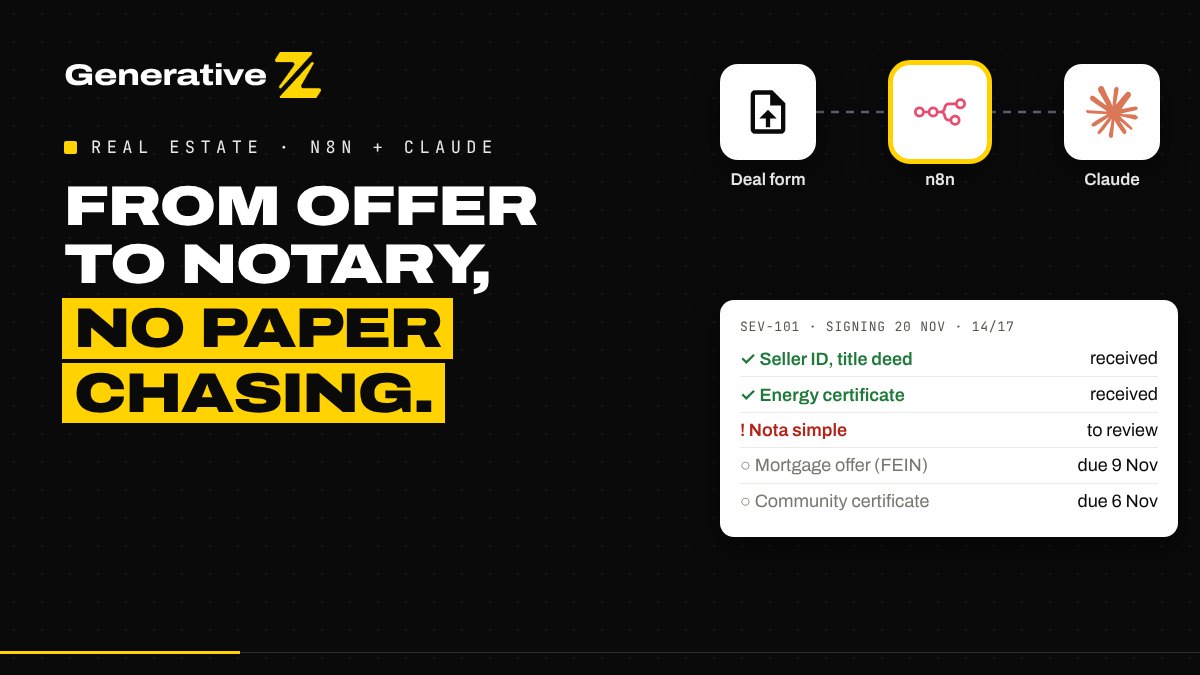
Between an accepted offer and the signing, an agent chases up to 17 documents across buyer, seller and bank. This n8n workflow builds the checklist, checks every document with Claude, sends reminders you approve, and tells you when the file is ready for the notary.
The problem: the weeks between yes and signing
The offer is accepted. Everyone is happy. Then the real work starts, and most of it is paperwork.
For a resale in Spain, the agent usually needs the seller's ID and title deed, the last IBI receipt, a community certificate showing no outstanding fees, the energy certificate, a fresh land registry extract (nota simple), the buyer's ID and NIE, proof of funds, the deposit contract (arras) and its payment. If the buyer takes a mortgage, add the bank valuation, the binding mortgage offer and the notary transparency appointment.
Each document has an owner, a deadline and its own traps:
- an ID that expires before the signing date;
- a registry extract that is too old by the time you reach the notary;
- a mortgage offer that arrives too late, when Spanish law requires the buyer to receive it at least 10 calendar days before signing;
- a buyer who does not have a NIE yet and did not know it was needed.
All of this usually lives in WhatsApp threads, email chains and the agent's memory. One missing paper moves the signing date.
What the workflow does
The workflow runs in n8n and has three entry points. Each one does a single job.
- Open the deal. When an offer is accepted, the agent fills in one form. The workflow builds the checklist and emails each person their own list.
- Check each document. Buyer and seller upload documents through a second form. Claude reads each file, fixed rules decide, and anything doubtful goes to the agent.
- Follow up every weekday. At 8:00 the workflow finds what is due or late, drafts reminders, and asks the agent to approve them in one email.
When every line of a deal is complete, the agent receives a notary pack: a summary of the deal with a link to every file.
Step 1: one form opens the deal
The agent enters the deal reference, the property, the price, buyer and seller with their email and language, the financing type and three dates: offer accepted, deposit deadline and target signing date. The form sits behind a login, so only the agency can open deals.
The workflow first validates everything: valid emails, a positive price, a signing date after the deposit deadline. Then it refuses a reference that already exists, so a double submission never creates a second file or a second round of emails.
The checklist itself comes from fixed rules, not AI. Every deadline is counted back from the signing date: the seller's ID and title deed 30 days before, the energy certificate 21 days before, the community certificate 14 days before, the registry extract 7 days before. A mortgage adds three items, with the mortgage offer due 11 days before signing to respect the 10-day minimum. If a deadline has already passed when the deal is opened, it moves to the next day and is flagged as tight.
Everything is saved to a Google Sheet: one row per deal, one row per document. It is the single place where the status of every file lives.
Step 2: everyone gets their own list
Buyer, seller and agent each receive one email with only their documents and their dates, in their language: English, Spanish or French. These emails use fixed templates, so nothing unexpected reaches a client.
Each email also carries the deal's access code. To upload a document, a person needs the deal reference, that code, and an email address that belongs to the deal. Anything else is not stored, the sender gets no reply, and the agent receives an alert.
Step 3: Claude reads each document, the rules decide
When a document arrives, the workflow checks the file first: PDF, JPG or PNG only, 10 MB maximum. It then stores the file in the agency's Google Drive folder and sends it to Claude.
Claude's job is narrow. It extracts facts and returns them in a fixed structure: what kind of document it is, the names on it, the issue and expiry dates, the property reference, and any concerns, such as a missing page or a name that differs from the deal. The file is treated as untrusted data: if someone writes instructions inside a PDF, they are ignored.
The decision is made by code, not by Claude:
- the document type must match what was expected;
- an ID must not expire before the signing date;
- the registry extract must be recent enough (30 days by default);
- any concern raised by Claude sends the document to review.
A clean document is marked as received and the sender gets a short confirmation. A doubtful one reaches the agent by email with the points to check and two buttons. Approve, and it is accepted. Decline, and the sender is asked for a new version.
Step 4: reminders you approve once a day
Every weekday at 8:00, the workflow reads the sheet and works out, with plain rules, what needs attention:
- documents due in the next 3 days, or already late;
- the agent's own tasks, such as booking the notary;
- deals signing within 10 days that still miss something;
- deals where every document is complete.
A person who received a reminder in the last 2 days is left alone. Claude then drafts one reminder per person, in their language, mentioning only their documents and dates. Before anything is sent, a code check makes sure each draft goes to someone who was planned and contains no unsafe content.
The agent receives a single email with the whole picture and every draft. One click on Approve sends the reminders. Decline, and nothing goes out that day.
Step 5: the notary pack
When every line of a deal is received, the workflow sends the agent a notary pack: property, price, financing, parties, notary office, target date and a link to each file in Drive.
The agent checks it and forwards it. The workflow never writes to the notary, the bank or the land registry on its own, and it never gives legal advice. It prepares the file; the professional stays in charge.
What you need to run it
- An n8n instance, self-hosted or n8n Cloud.
- Gmail, Google Sheets and Google Drive.
- An Anthropic API key for Claude.
Setting it up takes one Google Sheet with three tabs (deals, checklist and activity log), one private Drive folder and a Config node to fill in. Before using it on a real deal, run the test plan from the guide: a cash deal and a mortgage deal, a duplicate reference, an upload with a wrong access code, an expired ID, and a day where you decline the reminders.
The checklist is a starting point for a Spanish resale. Check it with your notary and adapt it to your region, to new builds or to rentals.
Get the workflow
We share the full n8n workflow, its setup guide and the checklist rules for free. Comment NOTARY on our LinkedIn post, or contact us and we will send it to you.
Want a version adapted to your agency, your CRM or your own checklist? Tell us about your process and we will map it with you.