
Insights & guides
Your weekly SEO + GEO plan, automated with n8n and Claude
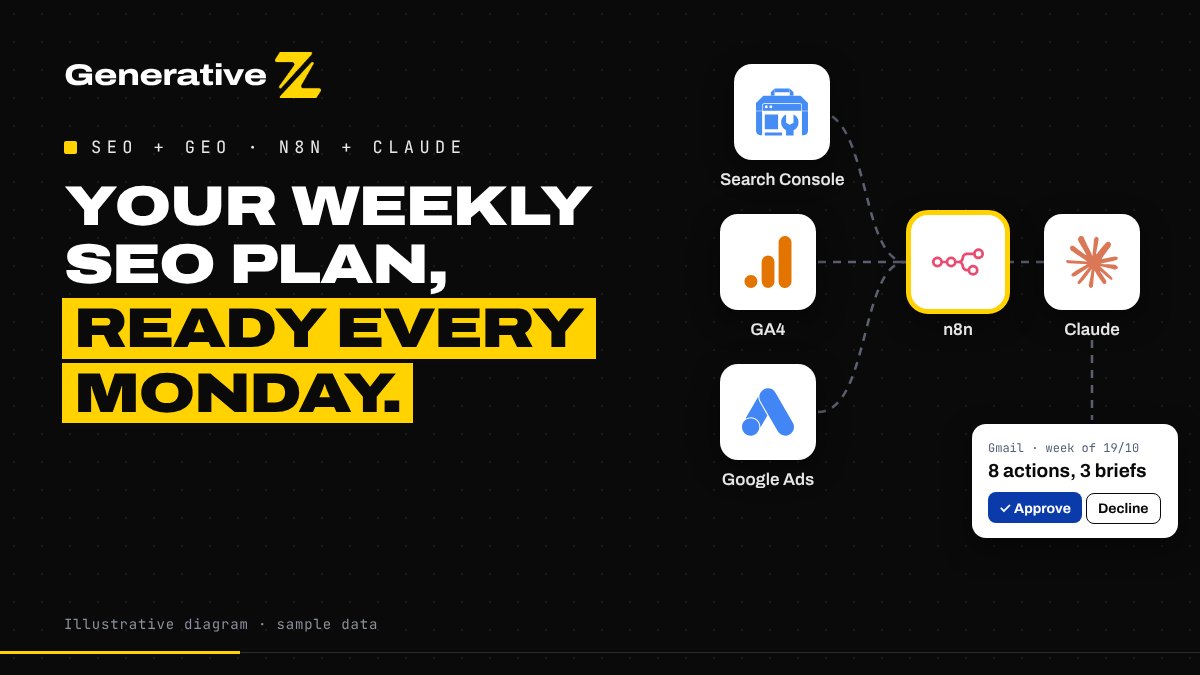
Search Console, GA4 and Google Ads each hold part of the answer. This n8n workflow joins them every Monday, checks whether AI assistants cite your site, and sends you a plan of 8 actions to approve in one click.
The problem: your data lives in 3 tools
Most small businesses already have the data they need to improve their visibility. It is just split across three tools that nobody has time to connect:
- Search Console tells you what people type into Google, and where your pages show up.
- Google Analytics 4 tells you what those visitors do once they land on your site.
- Google Ads tells you what you pay to appear, and which search terms actually convert.
Each tool answers one question. The useful answers sit between them: a query you pay for in Ads while you already rank in the top 3, a page with plenty of impressions and almost no clicks, a search term that keeps spending without a single conversion. Spotting those means exporting three reports, matching them by hand and deciding what to do. In practice, it rarely happens.
On top of that, a new channel has appeared. Your future customers increasingly ask ChatGPT, Claude or Perplexity instead of scrolling through Google. Ranking well is no longer enough if the AI answer recommends someone else. That is what GEO, Generative Engine Optimization, is about.
What the workflow does
The workflow runs in n8n every Monday at 7:00 and follows five steps. You can also start it by hand at any time.
- Collect. It pulls the last 30 days from Search Console, GA4 and Google Ads, in parallel.
- Score. It joins the three sources query by query and flags four kinds of opportunity.
- GEO check. It asks Claude, with web search, the questions your customers would ask, and records whether your site is cited.
- Plan. Claude writes up to 8 prioritised actions and up to 3 content briefs, each backed by a number from your data.
- Approve. You receive one email with two buttons. Approve, and the plan is saved to Google Sheets. Decline, and nothing happens.
Step 1: collect the three sources
Three HTTP Request nodes call the official APIs with your own Google credentials:
- Search Console: clicks, impressions and average position per query and per page.
- GA4: sessions, engagement and key events per landing page and per traffic source.
- Google Ads: search terms with impressions, clicks, cost and conversions.
The date range stops three days before today, because Search Console data is not final straight away. A Merge node waits for all three answers before going further, so the analysis always works on a complete picture.
Step 2: score four kinds of opportunity
A Code node joins everything by query and tags each one:
- SEO quick win: the query sits at position 8 to 20 with plenty of impressions. You are close to the first page, and a better page or a dedicated article can push it up.
- Paid to organic: an Ads term converts, but your organic ranking is weak. It is worth creating content for, so you stop paying for every visit.
- Cannibalisation: you pay for an Ads click on a query where you already rank in the top 3. The budget may be better spent elsewhere.
- Negative keyword: an Ads term keeps costing money without converting. It is a candidate for exclusion.
GA4 adds two signals: how well each landing page performs, and how many visits come from AI assistants such as ChatGPT, Perplexity or Claude. That second number is the part of GEO you can already measure.
Step 3: the GEO check
Measuring visits from AI assistants tells you what already works. It does not tell you where you are missing. So the workflow picks the most important queries of the week (five by default) and asks Claude, with web search turned on, to answer them the way a customer would.
For each answer, it records which sites are cited: yours, your competitors', or neither. Week after week, a GEO tracking sheet shows whether your visibility in AI answers is improving.
Step 4: a plan you can act on
All of this goes to Claude as a strategist with strict instructions:
- at most 8 actions, ranked by priority, across SEO content, existing pages, GEO and Google Ads;
- at most 3 content briefs, each with a target query, a format, an outline and a short FAQ;
- every action backed by a figure from the data provided;
- never invent data, clients or results;
- never change Google Ads automatically: everything is a recommendation.
The answer follows a fixed JSON structure, so the next nodes can turn it into an email and spreadsheet rows without guesswork.
Step 5: nothing ships without you
The plan arrives by Gmail as a short report: a summary, the action table, the briefs and the GEO results. The email has two buttons. n8n waits for your answer.
- Approve: each action becomes a row in an "Action plan" Google Sheet, with its priority, channel and justification, ready to assign.
- Decline: nothing is saved, and next Monday brings a fresh plan.
The workflow never publishes, never edits a page and never touches your Ads account. It prepares the decision, and you make it. That human step is what makes an automation something a team can trust.
What you need to run it
- An n8n instance, self-hosted or n8n Cloud.
- A Google account with access to your Search Console property and GA4 property.
- A Google Ads account with API access (a developer token), if you want the paid side.
- An Anthropic API key for Claude.
- Gmail and a Google Sheet for the approval and the history.
Setting it up means creating four credentials, filling in one Config node (site, GA4 property, Ads account, market, competitors, email address) and running it once by hand. Run that manual test before you rely on the Monday schedule: check each node's output, then approve a first plan and confirm the rows land in the sheet.
Get the workflow
We share the full n8n workflow and its step-by-step setup guide for free. Comment GEO on our LinkedIn post, or contact us and we will send it to you.
Want to build it with us? Our free discovery session in Seville, on Friday 23 October at Espacio RES (19:00 to 21:00, taught in English, 25 seats), is a hands-on evening: we build a first automation together, laptops open. Book your seat.