
Insights & guides
Autónomo OS: from your website to your gestoría, ready for VeriFactu
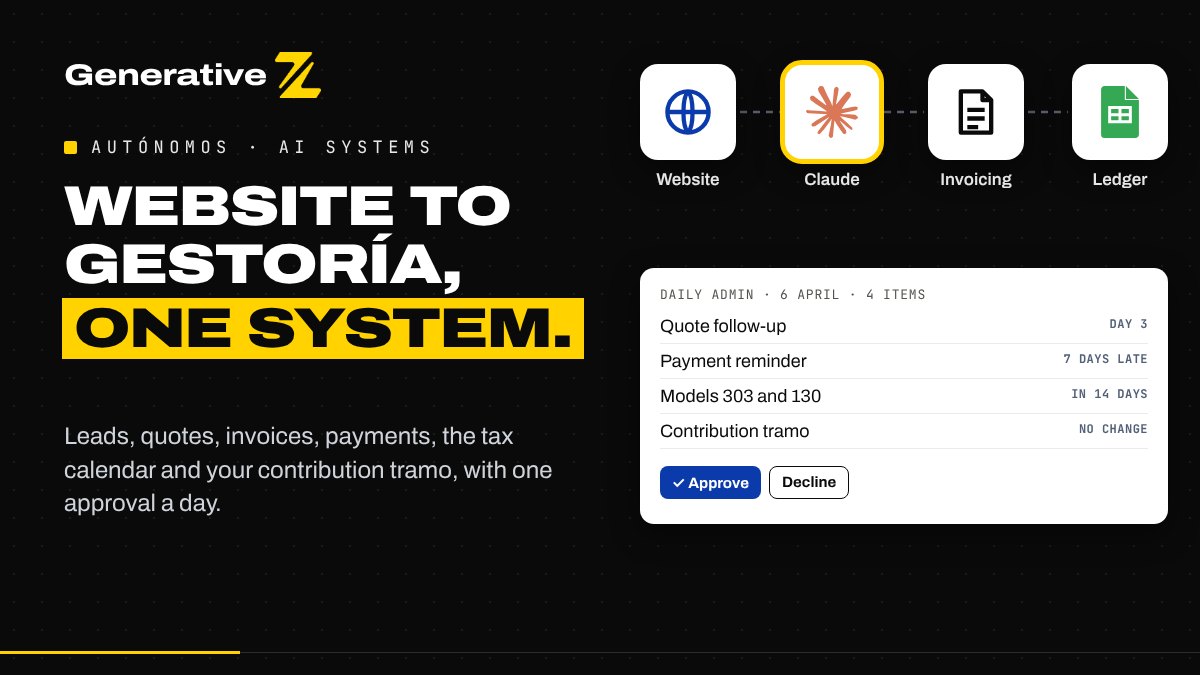
From July 2027, every autónomo in Spain will have to invoice with certified software. It is a good moment to connect the rest of the business too. This n8n workflow takes a lead from your website to a quote, an invoice, a payment and your gestoría's ledger, and asks your approval once a day.
What changes for autónomos
Three sets of rules shape an autónomo's admin in Spain right now. We checked them on 15 October 2026; confirm them with your gestoría, because dates in this area move.
- VeriFactu. Every invoice must be issued by certified software that records it and can send it to the Agencia Tributaria. After two postponements, the obligation starts on 1 January 2027 for companies and on 1 July 2027 for autónomos. An invoice made in Word or Excel will no longer do.
- B2B e-invoicing. Under the Ley Crea y Crece, invoices between businesses will become structured electronic invoices. The regulation (RD 238/2026) is published, but the order that sets the dates is still pending. Current estimates point to 2027 for companies above €8 million and 2028 for everyone else, autónomos included.
- Contributions on real income. Your monthly contribution depends on which of the 15 tramos your net income falls into. The tramos are frozen for 2026, you can change yours up to six times a year, and the Seguridad Social regularises the difference later, once your real income is known.
Add the usual calendar, models 303 and 130 every quarter, 390 and 347 once a year, and the income tax return, and an autónomo's admin is a part-time job.
One system instead of five tools
Most autónomos already have the pieces: a website with a contact form, an email inbox, a spreadsheet, an invoicing tool, maybe Stripe. What is missing is the connection between them, so every step is copied by hand.
Autónomo OS is one n8n workflow with five entry points:
- A lead arrives from your website.
- You create a quote after the call.
- The client accepts online, and the deposit invoice is issued.
- The client pays by card.
- Every morning, one digest lists what needs doing, and you approve it.
Claude reads and drafts. Fixed rules, written in code, decide. And nothing reaches a client before you approve it.
1. From the website form to a qualified lead
Your contact form posts to the workflow through a small server-side endpoint on your site, so the secret that protects the webhook is never visible in the browser. The workflow checks the privacy consent, a hidden anti-spam field and the email, and ignores the same person writing twice in 24 hours.
Claude then classifies the message: hot, warm, cold or spam, with the service, the urgency and a few questions to ask on the call. The message is treated as untrusted text, so instructions hidden in it are ignored.
The prospect receives an acknowledgement in English, Spanish or French. It is a fixed template, not an AI-written email. If the lead is hot, you get an alert with the summary.
2. A quote from your own price list
After the call, you open a short form, paste your notes and say whether the client is a business. Claude chooses lines only from your catalogue of services and prices, and writes the scope, assumptions, exclusions and timeline in the client's language.
The amounts are computed by code: the catalogue price, 21% VAT and, only when the client is a business or a professional, the IRPF withholding at 15% (or 7% in your first years). The quote gets a reference, an access code and a validity date. You read it in your inbox, approve it, and the client receives it with a link to accept.
3. Acceptance, then a certified invoice
The client accepts through a form with the quote reference, the access code, their email and their tax ID. The workflow refuses an unknown reference, a wrong code, a different email, an expired quote or a tax ID with an invalid format, and tells you.
When everything matches, you approve the deposit invoice. The workflow then asks your invoicing tool to create the client and issue the invoice. This is the important part for VeriFactu: n8n never creates the invoice itself. Your certified software does, with its numbering and records, so the workflow stays compliant as the rules change.
At the same time, the workflow creates a Stripe payment link, saves the invoice, adds the income to the ledger your gestoría uses, and emails the client a confirmation.
4. Payments matched to invoices
When the client pays by card, Stripe tells the workflow. The payment is matched to the invoice by its reference, its currency and its exact amount. A match marks the invoice as paid. Anything else, such as a different amount or an unknown reference, becomes an alert for you instead of a silent error.
5. One digest each morning
Every day at 9:00, the workflow reads your quotes, invoices and ledger, and prepares:
- a follow-up for quotes sent 3 and 7 days ago, and the expiry of old ones;
- payment reminders on the due date, then 7 and 15 days later;
- the tax calendar, 14, 7 and 2 days before each deadline, including the VeriFactu date;
- on the 1st of each month, a check of your contribution tramo.
The tramo check takes your net income so far this year from the ledger, applies the 7% generic deduction, finds the matching tramo and compares it with the one you pay. If they differ, the digest suggests a change before the next two-month window closes. It is an estimate to discuss with your gestoría, not a calculation of what you owe.
You receive all of it in one email. Approve, and the follow-ups and reminders go out, written from fixed templates in each client's language. Decline, and nothing is sent that day.
What it does not do
The workflow does not file any model with Hacienda, does not change your tramo with the Seguridad Social and does not give tax advice. It keeps your records connected and reminds you on time; your gestoría keeps validating and filing.
It also works with our workflow that prepares your quarter for the gestoría: both use the same ledger, so income from your invoices and expenses from your receipts end up in one place.
What you need to run it
- An n8n instance, self-hosted or n8n Cloud.
- Gmail and Google Sheets.
- An Anthropic API key for Claude.
- An invoicing tool with an API and VeriFactu certification, and a Stripe account.
- Access to your website's form handler.
The setup guide lists the sheet tabs, the credentials and a test plan to run in test mode before your first real client: a lead without consent, a duplicate, a quote for a business and for a private client, a refused acceptance, a test payment and a declined digest.
The figures in the examples are illustrative. Replace the price list with yours.
Get the workflow
We share the full n8n workflow and its setup guide for free. Comment AUTÓNOMO on our LinkedIn post, or contact us and we will send it to you.
Want it connected to your own website, invoicing tool and gestoría? Tell us how you work and we will map it with you.