
Insights & guides
Your quarter ready for the gestoría: an AI workflow for autónomos in Spain
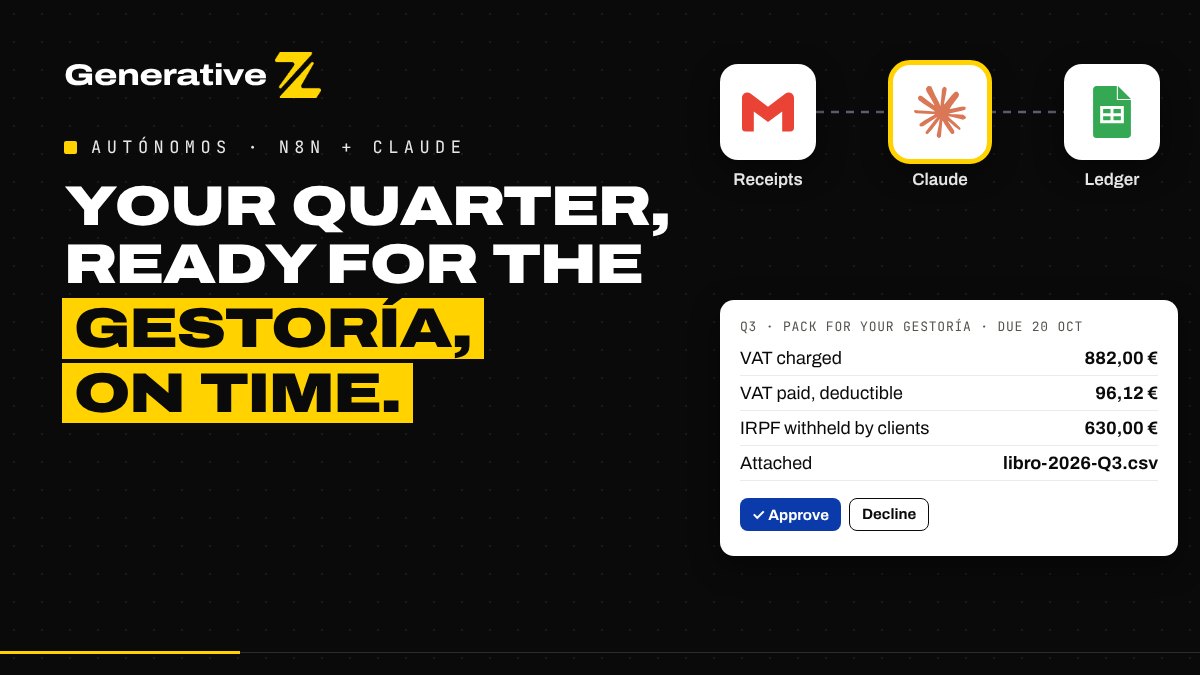
Every quarter, autónomos in Spain hunt for tickets, PDFs and photos before the 303 and 130 deadlines. This n8n workflow reads every receipt as it arrives, checks it with fixed rules, and sends your gestoría a clean pack a week before the deadline, once you approve it.
The problem: the quarter always arrives too fast
If you work as an autónomo in Spain, you know the rhythm. Four times a year, your gestoría needs your income and expenses to prepare models 303 (VAT) and 130 (income tax prepayment). The deadlines are 20 April, 20 July, 20 October and 30 January.
The documents, meanwhile, are everywhere:
- supplier invoices sitting in Gmail;
- paper tickets in your wallet or your car;
- photos sent on WhatsApp;
- Amazon and software invoices you never downloaded.
And each one comes with its own question. Is this invoice in my name? Is this ticket deductible without my NIF? Did I pay that lunch in cash? So the week before the deadline becomes an evening of searching, and some receipts never show up, which means expenses you could have deducted are lost.
What the workflow does
The workflow runs in n8n and works in four steps:
- Collect. Invoices arrive by email with a Gmail label, and paper tickets through a phone form.
- Read and check. Claude reads each document; fixed rules check the sums, the VAT, the NIF and the category.
- File. Each document goes to Google Drive and to a ledger in Google Sheets, once.
- Send the quarter. Every Monday you get a short brief. A week before each deadline, you approve the pack, and your gestoría receives it.
The workflow never files anything with Hacienda and never gives tax advice. It prepares your documents; your gestoría validates and files the declarations.
Step 1: collect without changing your habits
For email, you create one Gmail label, receipts, and a filter that applies it to your suppliers' invoices. Every 15 minutes, the workflow picks up new labelled emails and their PDF, JPG or PNG attachments.
For paper, a small form, protected by a login, opens on your phone. You take a photo of the ticket, add the business purpose if you want, and you are done. Saved as a shortcut on your home screen, it takes seconds.
Step 2: Claude reads, the rules check
Claude reads each document and returns the fiscal fields in a fixed structure: issuer and NIF, recipient and NIF, invoice number, date, each VAT line with its base, rate and amount, any IRPF withheld, the total and the payment method. When a field is missing or unreadable, it says so instead of guessing. The file is treated as untrusted data: instructions written inside a PDF are ignored.
Then fixed rules, written in code, do the checking:
- each VAT line must add up, and base + VAT − IRPF must equal the total;
- the VAT rate must be a Spanish rate: 21, 10, 5, 4 or 0;
- the NIF must have a valid format (Spanish NIF, NIE or CIF, or an EU VAT number);
- an invoice where you are the issuer is income, anything else is an expense;
- an expense must be in your name, and a simplified ticket without your NIF is marked as VAT not deductible;
- an EU supplier that charges no VAT is flagged as probable reverse charge, for your gestoría to declare.
Each expense is then categorised with keywords you control: software, telephone, office, training, professional services, travel, meals, rent. Travel, meals and telephone are always flagged for a quick check, because whether they are deductible depends on how you use them.
Step 3: every document in its place, once
Each file is saved to your Google Drive folder with a clear name: quarter, date, supplier and amount. A row is added to the ledger in Google Sheets with every field, the category, a link to the file and a status: ok, or to_review with the reason.
The same invoice can arrive twice, by email and by photo. The workflow recognises it by issuer, number, date and total, and never adds it twice.
Step 4: a Monday brief, then the pack
Every Monday at 8:00, you receive one email with the quarter so far (income and expenses, VAT charged and paid), the next deadline, and the list of documents to review, each with its reason. You fix a line in the sheet, set it to ok or excluded, and that is all.
Seven days before each deadline, the workflow prepares the quarterly pack:
- The totals are computed by code from the rows marked
ok: income base, VAT charged, IRPF withheld by your clients, expense base, deductible and non-deductible VAT, and expenses by category. Rows still to review are listed apart. - Claude writes a short cover email in Spanish for your gestoría, using only those figures.
- A check compares every figure in the email with the computed totals, and warns you if one does not match.
- You approve or decline in one email. On approval, your gestoría receives the email with the quarter's CSV and the Drive folder link, with you in copy.
Each quarter is recorded once sent, so it never goes twice.
What you need to run it
- An n8n instance, self-hosted or n8n Cloud.
- Gmail, Google Sheets and Google Drive.
- An Anthropic API key for Claude.
Setting it up takes one Gmail label, one Google Sheet with three tabs, one private Drive folder and a Config node with your name, NIF and your gestoría's email. Before relying on it, run the test plan from the guide: a normal invoice, a cash ticket, an EU supplier, one of your own invoices with IRPF, the same PDF twice, and a quarter pack you decline.
The figures are indicative. They come from your documents and fixed rules, and your gestoría remains the one who validates them.
Get the workflow
We share the full n8n workflow, its setup guide and the category rules for free. Comment GESTORÍA on our LinkedIn post, or contact us and we will send it to you.
Want it set up for you, connected to your invoicing tool or your gestoría's process? Tell us how you work and we will map it with you.